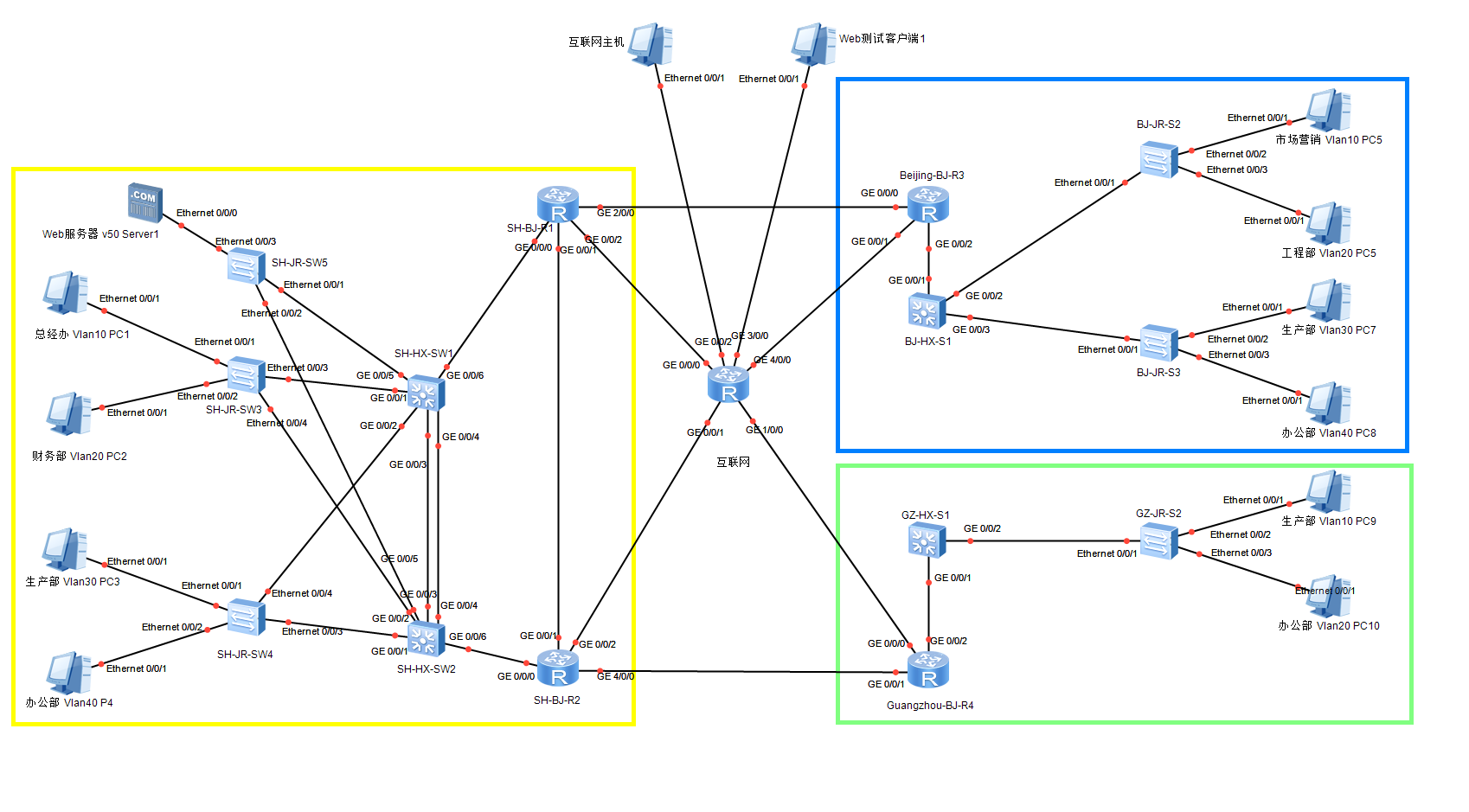
中国人寿园区网配置
中国人寿园区网配置
[!info] 基于 Huawei eNSP 的企业园区网络综合实验
涵盖 VLAN、Trunk、链路聚合、MSTP、VRRP、DHCP、OSPF、NAT、ACL 等核心技术。
本文以 X=3、Y=23 为例,记录完整配置过程。
网络拓扑概述
                    互联网
                   /      \
              R1(200.200.200.2)  R2(202.202.202.2)
                  |                |
             SW1(Vlan100)    SW2(Vlan100)
              /\    Eth-Trunk    /\
             /  \   聚合链路    /  \
           SW3  SW4  SW5    SW3  SW4  SW5
           |    |    |      |    |    |
          PC   PC   Server PC   PC   Server

    R1 --- R2(互联)
    R1 --- R3 --- BJ-HX-S1(北京分部)
    R2 --- R4 --- GZ-HX-S1(广州分部)
设备清单
| 设备 | 角色 | 说明 |
|---|---|---|
| SH-HX-SW1/SW2 | 总部核心交换机 | 双核心,互做 VRRP 主备 |
| SH-JR-SW3 | 接入层交换机 | VLAN10 总经办、VLAN20 财务部 |
| SH-JR-SW4 | 接入层交换机 | VLAN30 生产部、VLAN40 办公部 |
| SH-JR-SW5 | 接入层交换机 | VLAN50 服务器区 |
| SH-BJ-R1/R2 | 总部边界路由器 | NAT 出口,OSPF 下发默认路由 |
| BJ-HX-S1 | 北京分部核心交换机 | VLAN10~40 |
| Beijing-BJ-R3 | 北京分部路由器 | NAT 出口 |
| GZ-HX-S1 | 广州分部核心交换机 | VLAN10~20 |
| Guangzhou-BJ-R4 | 广州分部路由器 | NAT 出口 |
IP 地址规划
| VLAN | 网段 | 用途 | VRRP 虚拟地址 |
|---|---|---|---|
| VLAN10 | 10.3.23.0/24 | 总经办 | 10.3.23.254 |
| VLAN20 | 10.3.24.0/24 | 财务部 | 10.3.24.254 |
| VLAN30 | 10.3.25.0/24 | 生产部 | 10.3.25.254 |
| VLAN40 | 10.3.26.0/24 | 办公部 | 10.3.26.254 |
| VLAN50 | 10.3.27.0/24 | 服务器区 | 10.3.27.254 |
| VLAN100 | 10.3.28.0/30 | 互联链路 | — |
步骤一:创建 VLAN 并将接口加入对应 VLAN
在接入层交换机上创建业务 VLAN,将用户接口配置为 Access 并划入对应 VLAN。
SH-JR-SW3(总经办 VLAN10、财务部 VLAN20)
sys
sysname SH-JR-SW3
un in en
vlan batch 10 20

interface Ethernet0/0/1
 port link-type access
 port default vlan 10

interface Ethernet0/0/2
 port link-type access
 port default vlan 20
SH-JR-SW4(生产部 VLAN30、办公部 VLAN40)
sys
sysname SH-JR-SW4
un in en
vlan batch 30 40

interface Ethernet0/0/1
 port link-type access
 port default vlan 30

interface Ethernet0/0/2
 port link-type access
 port default vlan 40
SH-JR-SW5(服务器区 VLAN50)
sys
sysname SH-JR-SW5
un in en
vlan batch 50

interface Ethernet0/0/3
 port link-type access
 port default vlan 50
验证
display vlan
display port vlan
步骤二:接入层与核心交换机相连接口配置为 Trunk
接入层上联接口和核心交换机下联接口均配置为 Trunk,允许所有 VLAN 通过。
接入层交换机
# SH-JR-SW3
interface Ethernet0/0/3
 port link-type trunk
 port trunk allow-pass vlan all
interface Ethernet0/0/4
 port link-type trunk
 port trunk allow-pass vlan all

# SH-JR-SW4
interface Ethernet0/0/3
 port link-type trunk
 port trunk allow-pass vlan all
interface Ethernet0/0/4
 port link-type trunk
 port trunk allow-pass vlan all

# SH-JR-SW5
interface Ethernet0/0/1
 port link-type trunk
 port trunk allow-pass vlan all
interface Ethernet0/0/2
 port link-type trunk
 port trunk allow-pass vlan all
核心层交换机
SW1 和 SW2 的 GE0/0/3 和 GE0/0/4 用于链路聚合,GE0/0/6 连接路由器,其余接口连接接入层交换机。
# SH-HX-SW1
sys
sysname SH-HX-SW1
un in en
vlan batch 10 20 30 40 50 100

interface GigabitEthernet0/0/1
 port link-type trunk
 port trunk allow-pass vlan all
interface GigabitEthernet0/0/2
 port link-type trunk
 port trunk allow-pass vlan all
interface GigabitEthernet0/0/3
 eth-trunk 1
interface GigabitEthernet0/0/4
 eth-trunk 1
interface GigabitEthernet0/0/5
 port link-type trunk
 port trunk allow-pass vlan all
interface GigabitEthernet0/0/6
 port link-type access
 port default vlan 100

# SH-HX-SW2(同理)
sys
sysname SH-HX-SW2
un in en
vlan batch 10 20 30 40 50 100

interface GigabitEthernet0/0/1
 port link-type trunk
 port trunk allow-pass vlan all
interface GigabitEthernet0/0/2
 port link-type trunk
 port trunk allow-pass vlan all
interface GigabitEthernet0/0/3
 eth-trunk 1
interface GigabitEthernet0/0/4
 eth-trunk 1
interface GigabitEthernet0/0/5
 port link-type trunk
 port trunk allow-pass vlan all
interface GigabitEthernet0/0/6
 port link-type access
 port default vlan 100
验证
display interface brief
display port vlan
步骤三:分部核心交换机创建业务网关地址
北京和广州分部为单核心架构,直接在 Vlanif 上配置网关 IP。
BJ-HX-S1(北京分部)
sys
sysname BJ-HX-S1
un in en
vlan batch 10 20 30 40 100

interface Vlanif10
 ip address 10.3.29.254 24
interface Vlanif20
 ip address 10.3.30.254 24
interface Vlanif30
 ip address 10.3.31.254 24
interface Vlanif40
 ip address 10.3.32.254 24
interface Vlanif100
 ip address 10.3.28.22 30

interface GigabitEthernet0/0/1
 port link-type access
 port default vlan 100
GZ-HX-S1(广州分部)
sys
sysname GZ-HX-S1
un in en
vlan batch 10 20 100

interface Vlanif10
 ip address 10.3.33.254 24
interface Vlanif20
 ip address 10.3.34.254 24
interface Vlanif100
 ip address 10.3.28.26 30

interface GigabitEthernet0/0/1
 port link-type access
 port default vlan 100
验证
display ip interface brief
步骤四:总部链路聚合 + MSTP 配置
链路聚合(Eth-Trunk)
将 SW1 和 SW2 之间的 GE0/0/3 和 GE0/0/4 捆绑为 Eth-Trunk 1,使用 LACP 静态模式,提高带宽和可靠性。
# SH-HX-SW1
interface Eth-Trunk 1
 port link-type trunk
 port trunk allow-pass vlan all
 mode lacp-static

# SH-HX-SW2
interface Eth-Trunk 1
 port link-type trunk
 port trunk allow-pass vlan all
 mode lacp-static
MSTP 多实例配置
通过 MSTP 将不同 VLAN 映射到不同实例,配合 VRRP 实现流量负载均衡:
- Instance 1:VLAN 10、30、50 → SW1 为主根
- Instance 2:VLAN 20、40 → SW2 为主根
所有总部交换机(包括接入层)的 MSTP 区域配置必须一致:
# 所有总部交换机都要配
stp region-configuration
 region-name RENSHOU
 instance 1 vlan 10 30 50
 instance 2 vlan 20 40
 active region-configuration

# SH-HX-SW1
stp instance 1 root primary
stp instance 2 root secondary

# SH-HX-SW2
stp instance 2 root primary
stp instance 1 root secondary
边缘端口
接入层连接 PC 的端口配置为边缘端口,加速 STP 收敛:
# SH-JR-SW3
interface Ethernet0/0/1
 stp edged-port enable
interface Ethernet0/0/2
 stp edged-port enable

# SH-JR-SW4
interface Ethernet0/0/1
 stp edged-port enable
interface Ethernet0/0/2
 stp edged-port enable

# SH-JR-SW5
interface Ethernet0/0/3
 stp edged-port enable
验证
display eth-trunk 1
display stp brief
display stp instance 1
display stp instance 2
关键确认:
- Eth-Trunk 状态
up,两个成员端口均为Selected - Instance 1:SW1 所有端口为
DESI(指定端口 = 根桥) - Instance 2:SW2 所有端口为
DESI
步骤五:总部 VRRP 配置(互做主备)
VRRP 与 MSTP 配合,保证网关始终在 STP 转发路径上:
| VLAN | VRRP Master | Priority | 说明 |
|---|---|---|---|
| VLAN10 | SW1 | 120 | Instance 1 根桥 |
| VLAN20 | SW2 | 120 | Instance 2 根桥 |
| VLAN30 | SW1 | 120 | Instance 1 根桥 |
| VLAN40 | SW2 | 120 | Instance 2 根桥 |
| VLAN50 | SW1 | 120 | Instance 1 根桥 |
SH-HX-SW1
interface Vlanif10
 ip address 10.3.23.1 24
 vrrp vrid 10 virtual-ip 10.3.23.254
 vrrp vrid 10 priority 120

interface Vlanif20
 ip address 10.3.24.1 24
 vrrp vrid 20 virtual-ip 10.3.24.254

interface Vlanif30
 ip address 10.3.25.1 24
 vrrp vrid 30 virtual-ip 10.3.25.254
 vrrp vrid 30 priority 120

interface Vlanif40
 ip address 10.3.26.1 24
 vrrp vrid 40 virtual-ip 10.3.26.254

interface Vlanif50
 ip address 10.3.27.1 24
 vrrp vrid 50 virtual-ip 10.3.27.254
 vrrp vrid 50 priority 120

interface Vlanif100
 ip address 10.3.28.1 30
SH-HX-SW2
interface Vlanif10
 ip address 10.3.23.2 24
 vrrp vrid 10 virtual-ip 10.3.23.254

interface Vlanif20
 ip address 10.3.24.2 24
 vrrp vrid 20 virtual-ip 10.3.24.254
 vrrp vrid 20 priority 120

interface Vlanif30
 ip address 10.3.25.2 24
 vrrp vrid 30 virtual-ip 10.3.25.254

interface Vlanif40
 ip address 10.3.26.2 24
 vrrp vrid 40 virtual-ip 10.3.26.254
 vrrp vrid 40 priority 120

interface Vlanif50
 ip address 10.3.27.2 24
 vrrp vrid 50 virtual-ip 10.3.27.254

interface Vlanif100
 ip address 10.3.28.5 30
验证
display vrrp brief
期望结果:
- SW1:Master 3 个(VLAN10/30/50),Backup 2 个(VLAN20/40)
- SW2:Master 2 个(VLAN20/40),Backup 3 个(VLAN10/30/50)
步骤六:各三层设备路由接口 IP 地址配置
配置路由器各接口 IP、默认路由指向运营商网关、NAT 地址转换。
SH-BJ-R1
sys
sysname SH-BJ-R1
un in en

interface GigabitEthernet0/0/0
 ip address 10.3.28.2 30
interface GigabitEthernet0/0/1
 ip address 10.3.28.9 30
interface GigabitEthernet2/0/0
 ip address 10.3.28.13 30
interface GigabitEthernet0/0/2
 ip address 200.200.200.2 24
 nat outbound 2000

acl 2000
 rule permit source 10.3.0.0 0.0.255.255

ip route-static 0.0.0.0 0.0.0.0 200.200.200.1
SH-BJ-R2
sys
sysname SH-BJ-R2
un in en

interface GigabitEthernet0/0/0
 ip address 10.3.28.6 30
interface GigabitEthernet0/0/1
 ip address 10.3.28.10 30
interface GigabitEthernet4/0/0
 ip address 10.3.28.17 30
interface GigabitEthernet0/0/2
 ip address 202.202.202.2 24
 nat outbound 2000

acl 2000
 rule permit source 10.3.0.0 0.0.255.255

ip route-static 0.0.0.0 0.0.0.0 202.202.202.1
Beijing-BJ-R3
sys
sysname Beijing-BJ-R3
un in en

interface GigabitEthernet0/0/0
 ip address 100.100.100.2 24
 nat outbound 2000
interface GigabitEthernet0/0/1
 ip address 10.3.28.14 30
interface GigabitEthernet0/0/2
 ip address 10.3.28.21 30

acl 2000
 rule permit source 10.3.0.0 0.0.255.255

ip route-static 0.0.0.0 0.0.0.0 100.100.100.1
Guangzhou-BJ-R4
sys
sysname Guangzhou-BJ-R4
un in en

interface GigabitEthernet0/0/0
 ip address 101.101.101.2 24
 nat outbound 2000
interface GigabitEthernet0/0/1
 ip address 10.3.28.18 30
interface GigabitEthernet0/0/2
 ip address 10.3.28.25 30

acl 2000
 rule permit source 10.3.0.0 0.0.255.255

ip route-static 0.0.0.0 0.0.0.0 101.101.101.1
验证
display ip interface brief
步骤七:核心交换机配置 DHCP 服务器
总部双核心 DHCP
SW1 和 SW2 均配置所有 VLAN 的地址池,全部使用 dhcp select global。VRRP Master 网关直接用本地地址池响应 DHCP 请求,无需 relay 中转。
# SW1 和 SW2 都要配
dhcp enable

ip pool vlan10
 gateway-list 10.3.23.254
 network 10.3.23.0 mask 255.255.255.0
 excluded-ip-address 10.3.23.1 10.3.23.2 10.3.23.254
 dns-list 8.8.8.8
 lease day 3

ip pool vlan20
 gateway-list 10.3.24.254
 network 10.3.24.0 mask 255.255.255.0
 excluded-ip-address 10.3.24.1 10.3.24.2 10.3.24.254
 dns-list 8.8.8.8
 lease day 3

ip pool vlan30
 gateway-list 10.3.25.254
 network 10.3.25.0 mask 255.255.255.0
 excluded-ip-address 10.3.25.1 10.3.25.2 10.3.25.254
 dns-list 8.8.8.8
 lease day 3

ip pool vlan40
 gateway-list 10.3.26.254
 network 10.3.26.0 mask 255.255.255.0
 excluded-ip-address 10.3.26.1 10.3.26.2 10.3.26.254
 dns-list 8.8.8.8
 lease day 3

ip pool vlan50
 gateway-list 10.3.27.254
 network 10.3.27.0 mask 255.255.255.0
 excluded-ip-address 10.3.27.1 10.3.27.2 10.3.27.254
 dns-list 8.8.8.8
 lease day 3

# 各 Vlanif 下启用 DHCP
interface Vlanif10
 dhcp select global
interface Vlanif20
 dhcp select global
interface Vlanif30
 dhcp select global
interface Vlanif40
 dhcp select global
interface Vlanif50
 dhcp select global
北京分部 DHCP
# BJ-HX-S1
dhcp enable

ip pool bj-vlan10
 gateway-list 10.3.29.254
 network 10.3.29.0 mask 255.255.255.0
 excluded-ip-address 10.3.29.254
 dns-list 8.8.8.8
 lease day 3

ip pool bj-vlan20
 gateway-list 10.3.30.254
 network 10.3.30.0 mask 255.255.255.0
 excluded-ip-address 10.3.30.254
 dns-list 8.8.8.8
 lease day 3

ip pool bj-vlan30
 gateway-list 10.3.31.254
 network 10.3.31.0 mask 255.255.255.0
 excluded-ip-address 10.3.31.254
 dns-list 8.8.8.8
 lease day 3

ip pool bj-vlan40
 gateway-list 10.3.32.254
 network 10.3.32.0 mask 255.255.255.0
 excluded-ip-address 10.3.32.254
 dns-list 8.8.8.8
 lease day 3

interface Vlanif10
 dhcp select global
interface Vlanif20
 dhcp select global
interface Vlanif30
 dhcp select global
interface Vlanif40
 dhcp select global
广州分部 DHCP
# GZ-HX-S1
dhcp enable

ip pool gz-vlan10
 gateway-list 10.3.33.254
 network 10.3.33.0 mask 255.255.255.0
 excluded-ip-address 10.3.33.254
 dns-list 8.8.8.8
 lease day 3

ip pool gz-vlan20
 gateway-list 10.3.34.254
 network 10.3.34.0 mask 255.255.255.0
 excluded-ip-address 10.3.34.254
 dns-list 8.8.8.8
 lease day 3

interface Vlanif10
 dhcp select global
interface Vlanif20
 dhcp select global
验证
display ip pool
display dhcp server statistics
步骤八:OSPF 动态路由配置
所有三层设备配置 OSPF,路由器通过 default-route-advertise always 向内网下发默认路由,使内网设备可以访问互联网。
# SH-HX-SW1
ospf 1 router-id 11.11.11.11
 area 0
  network 10.3.23.0 0.0.0.255
  network 10.3.24.0 0.0.0.255
  network 10.3.25.0 0.0.0.255
  network 10.3.26.0 0.0.0.255
  network 10.3.27.0 0.0.0.255
  network 10.3.28.0 0.0.0.3

# SH-HX-SW2
ospf 1 router-id 12.12.12.12
 area 0
  network 10.3.23.0 0.0.0.255
  network 10.3.24.0 0.0.0.255
  network 10.3.25.0 0.0.0.255
  network 10.3.26.0 0.0.0.255
  network 10.3.27.0 0.0.0.255
  network 10.3.28.4 0.0.0.3

# SH-BJ-R1
ospf 1 router-id 1.1.1.1
 default-route-advertise always
 area 0
  network 10.3.28.0 0.0.0.255
  network 200.200.200.0 0.0.0.255

# SH-BJ-R2
ospf 1 router-id 2.2.2.2
 default-route-advertise always
 area 0
  network 10.3.28.0 0.0.0.255
  network 202.202.202.0 0.0.0.255

# BJ-HX-S1
ospf 1 router-id 31.31.31.31
 area 0
  network 10.3.29.0 0.0.0.255
  network 10.3.30.0 0.0.0.255
  network 10.3.31.0 0.0.0.255
  network 10.3.32.0 0.0.0.255
  network 10.3.28.20 0.0.0.3

# Beijing-BJ-R3
ospf 1 router-id 3.3.3.3
 default-route-advertise always
 area 0
  network 10.3.28.0 0.0.0.255
  network 100.100.100.0 0.0.0.255

# GZ-HX-S1
ospf 1 router-id 41.41.41.41
 area 0
  network 10.3.33.0 0.0.0.255
  network 10.3.34.0 0.0.0.255
  network 10.3.28.24 0.0.0.3

# Guangzhou-BJ-R4
ospf 1 router-id 4.4.4.4
 default-route-advertise always
 area 0
  network 10.3.28.0 0.0.0.255
  network 101.101.101.0 0.0.0.255
验证
display ospf peer brief
display ip routing-table protocol ospf
display ip routing-table
步骤九:ACL 访问控制
需求
财务部(VLAN20)只允许总经办(VLAN10)访问,禁止其他部门访问。
配置要点
- 第一条规则必须放行 DHCP 流量(UDP 67 端口),否则 ACL 末尾的隐式 deny 会拦截 DHCP 请求,导致 PC 无法获取 IP
- 在 SW1 和 SW2 的 Vlanif20 入方向都应用 ACL,确保无论流量从哪台核心进来都能过滤
# SH-HX-SW1 和 SH-HX-SW2 都要配
acl 3100
 rule permit udp destination-port eq 67
 rule permit ip source 10.3.23.0 0.0.0.255 destination 10.3.24.0 0.0.0.255
 rule deny ip source 10.3.25.0 0.0.0.255 destination 10.3.24.0 0.0.0.255
 rule deny ip source 10.3.26.0 0.0.0.255 destination 10.3.24.0 0.0.0.255
 rule deny ip source 10.3.27.0 0.0.0.255 destination 10.3.24.0 0.0.0.255

interface Vlanif20
 traffic-filter inbound acl 3100
[!warning] 踩坑提示
如果 ACL 被接口引用后无法修改,需先在接口下undo traffic-filter取消引用,再修改或重建 ACL,最后重新应用。
验证
display acl 3100
display traffic-filter statistics interface Vlanif20 inbound
| 测试项 | 预期结果 |
|---|---|
| 总经办 → 财务部 | ✅ 通 |
| 生产部 → 财务部 | ❌ 不通 |
| 办公部 → 财务部 | ❌ 不通 |
| 服务器区 → 财务部 | ❌ 不通 |
| 生产部 → 总经办 | ✅ 通(不在 ACL 限制范围) |
步骤十:DHCP 连通性测试
PC 端操作
- eNSP 中双击 PC,IP 获取方式选择 DHCP
- 打开命令行,输入
ipconfig查看获取的 IP 地址
连通性测试清单
# 同网段测试
ping 10.3.23.2
ping 10.3.24.2

# 总部内部跨网段
ping 10.3.24.x       (总经办 ping 财务部)
ping 10.3.25.x       (总经办 ping 生产部)

# 总部到分部
ping 10.3.29.254     (总部 ping 北京分部)
ping 10.3.33.254     (总部 ping 广州分部)

# ACL 效果测试
# 从总经办 PC ping 财务部 PC → 应该通
# 从生产部 PC ping 财务部 PC → 应该不通

# 互联网测试
ping 200.200.200.1
ping 202.202.202.1
ping 100.100.100.1
ping 101.101.101.1
交换机验证
display vrrp brief
display ospf peer brief
display ip routing-table
display acl 3100
踩坑记录
1. DHCP 分配失败
现象:PC 获取不到 IP,ipconfig 显示 0.0.0.0。
原因:最初使用 dhcp select relay 跨交换机转发 DHCP 请求,但 eNSP 对 relay 支持不稳定。
解决:SW1 和 SW2 均配置所有 VLAN 的地址池,全部使用 dhcp select global,由 VRRP Master 直接响应。
2. ACL 导致 DHCP 失效
现象:配了 ACL 后 PC 又获取不到 IP。
原因:ACL 末尾有隐式 deny all,DHCP 请求(源 0.0.0.0 → 目的 255.255.255.255)不匹配任何显式规则被丢弃。
解决:在 ACL 第一条加 rule permit udp destination-port eq 67 放行 DHCP 流量。
3. ACL 被引用无法修改
现象:undo acl 3100 提示 “The ACL group is in use, deletion forbidden!”。
解决:先在接口下取消引用(undo traffic-filter),再删除重建 ACL,最后重新应用。
4. 链路聚合接口对应错误
现象:GE0/0/1 和 GE0/0/2 误加入 Eth-Trunk,实际应连接接入层交换机。
解决:确认 GE0/0/3 和 GE0/0/4 才是 SW1↔SW2 的互联链路,加入 Eth-Trunk 1;GE0/0/1、GE0/0/2、GE0/0/5 配置为 trunk 连接入层。
5. 掩码不匹配
现象:同一链路两端掩码不一致(一端 /24,另一端 /30),导致无法通信。
解决:点对点链路统一使用 /30 掩码,节省地址空间且避免路由器多接口同网段冲突。
验证命令速查表
| 步骤 | 验证命令 |
|---|---|
| VLAN 与接口 | display vlan、display port vlan |
| Trunk 接口 | display interface brief、display port vlan |
| 分部网关 | display ip interface brief |
| 链路聚合 + MSTP | display eth-trunk 1、display stp brief、display stp instance 1/2 |
| VRRP | display vrrp brief |
| 路由接口 IP | display ip interface brief |
| DHCP | display ip pool、display dhcp server statistics |
| OSPF | display ospf peer brief、display ip routing-table protocol ospf |
| ACL | display acl 3100、display traffic-filter statistics interface Vlanif20 inbound |
| 连通性 | ping 各目标地址 |
完整命令
SH-JR-SW3(总部接入层交换机3)
sys
sysname SH-JR-SW3
un in en
vlan batch 10 20

stp region-configuration
 region-name RENSHOU
 instance 1 vlan 10 30 50
 instance 2 vlan 20 40
 active region-configuration

interface Ethernet0/0/1
 port link-type access
 port default vlan 10
 stp edged-port enable

interface Ethernet0/0/2
 port link-type access
 port default vlan 20
 stp edged-port enable

interface Ethernet0/0/3
 port link-type trunk
 port trunk allow-pass vlan all

interface Ethernet0/0/4
 port link-type trunk
 port trunk allow-pass vlan all
SH-JR-SW4(总部接入层交换机4)
sys
sysname SH-JR-SW4
un in en
vlan batch 30 40

stp region-configuration
 region-name RENSHOU
 instance 1 vlan 10 30 50
 instance 2 vlan 20 40
 active region-configuration

interface Ethernet0/0/1
 port link-type access
 port default vlan 30
 stp edged-port enable

interface Ethernet0/0/2
 port link-type access
 port default vlan 40
 stp edged-port enable

interface Ethernet0/0/3
 port link-type trunk
 port trunk allow-pass vlan all

interface Ethernet0/0/4
 port link-type trunk
 port trunk allow-pass vlan all
SH-JR-SW5(总部接入层交换机5)
sys
sysname SH-JR-SW5
un in en
vlan batch 50

stp region-configuration
 region-name RENSHOU
 instance 1 vlan 10 30 50
 instance 2 vlan 20 40
 active region-configuration

interface Ethernet0/0/3
 port link-type access
 port default vlan 50
 stp edged-port enable

interface Ethernet0/0/1
 port link-type trunk
 port trunk allow-pass vlan all

interface Ethernet0/0/2
 port link-type trunk
 port trunk allow-pass vlan all
SH-HX-SW1(总部核心交换机1)
sys
sysname SH-HX-SW1
un in en
vlan batch 10 20 30 40 50 100
dhcp enable

stp region-configuration
 region-name RENSHOU
 instance 1 vlan 10 30 50
 instance 2 vlan 20 40
 active region-configuration
stp instance 1 root primary
stp instance 2 root secondary

interface Eth-Trunk 1
 port link-type trunk
 port trunk allow-pass vlan all
 mode lacp-static

interface GigabitEthernet0/0/1
 port link-type trunk
 port trunk allow-pass vlan all

interface GigabitEthernet0/0/2
 port link-type trunk
 port trunk allow-pass vlan all

interface GigabitEthernet0/0/3
 eth-trunk 1

interface GigabitEthernet0/0/4
 eth-trunk 1

interface GigabitEthernet0/0/5
 port link-type trunk
 port trunk allow-pass vlan all

interface GigabitEthernet0/0/6
 port link-type access
 port default vlan 100

ip pool vlan10
 gateway-list 10.3.23.254
 network 10.3.23.0 mask 255.255.255.0
 excluded-ip-address 10.3.23.1 10.3.23.2 10.3.23.254
 dns-list 8.8.8.8
 lease day 3

ip pool vlan20
 gateway-list 10.3.24.254
 network 10.3.24.0 mask 255.255.255.0
 excluded-ip-address 10.3.24.1 10.3.24.2 10.3.24.254
 dns-list 8.8.8.8
 lease day 3

ip pool vlan30
 gateway-list 10.3.25.254
 network 10.3.25.0 mask 255.255.255.0
 excluded-ip-address 10.3.25.1 10.3.25.2 10.3.25.254
 dns-list 8.8.8.8
 lease day 3

ip pool vlan40
 gateway-list 10.3.26.254
 network 10.3.26.0 mask 255.255.255.0
 excluded-ip-address 10.3.26.1 10.3.26.2 10.3.26.254
 dns-list 8.8.8.8
 lease day 3

ip pool vlan50
 gateway-list 10.3.27.254
 network 10.3.27.0 mask 255.255.255.0
 excluded-ip-address 10.3.27.1 10.3.27.2 10.3.27.254
 dns-list 8.8.8.8
 lease day 3

acl 3100
 rule permit udp destination-port eq 67
 rule permit ip source 10.3.23.0 0.0.0.255 destination 10.3.24.0 0.0.0.255
 rule deny ip source 10.3.25.0 0.0.0.255 destination 10.3.24.0 0.0.0.255
 rule deny ip source 10.3.26.0 0.0.0.255 destination 10.3.24.0 0.0.0.255
 rule deny ip source 10.3.27.0 0.0.0.255 destination 10.3.24.0 0.0.0.255

interface Vlanif10
 ip address 10.3.23.1 24
 vrrp vrid 10 virtual-ip 10.3.23.254
 vrrp vrid 10 priority 120
 dhcp select global

interface Vlanif20
 ip address 10.3.24.1 24
 vrrp vrid 20 virtual-ip 10.3.24.254
 dhcp select global
 traffic-filter inbound acl 3100

interface Vlanif30
 ip address 10.3.25.1 24
 vrrp vrid 30 virtual-ip 10.3.25.254
 vrrp vrid 30 priority 120
 dhcp select global

interface Vlanif40
 ip address 10.3.26.1 24
 vrrp vrid 40 virtual-ip 10.3.26.254
 dhcp select global

interface Vlanif50
 ip address 10.3.27.1 24
 vrrp vrid 50 virtual-ip 10.3.27.254
 vrrp vrid 50 priority 120
 dhcp select global

interface Vlanif100
 ip address 10.3.28.1 30

ospf 1 router-id 11.11.11.11
 area 0
  network 10.3.23.0 0.0.0.255
  network 10.3.24.0 0.0.0.255
  network 10.3.25.0 0.0.0.255
  network 10.3.26.0 0.0.0.255
  network 10.3.27.0 0.0.0.255
  network 10.3.28.0 0.0.0.3
SH-HX-SW2(总部核心交换机2)
sys
sysname SH-HX-SW2
un in en
vlan batch 10 20 30 40 50 100
dhcp enable

stp region-configuration
 region-name RENSHOU
 instance 1 vlan 10 30 50
 instance 2 vlan 20 40
 active region-configuration
stp instance 2 root primary
stp instance 1 root secondary

interface Eth-Trunk 1
 port link-type trunk
 port trunk allow-pass vlan all
 mode lacp-static

interface GigabitEthernet0/0/1
 port link-type trunk
 port trunk allow-pass vlan all

interface GigabitEthernet0/0/2
 port link-type trunk
 port trunk allow-pass vlan all

interface GigabitEthernet0/0/3
 eth-trunk 1

interface GigabitEthernet0/0/4
 eth-trunk 1

interface GigabitEthernet0/0/5
 port link-type trunk
 port trunk allow-pass vlan all

interface GigabitEthernet0/0/6
 port link-type access
 port default vlan 100

ip pool vlan10
 gateway-list 10.3.23.254
 network 10.3.23.0 mask 255.255.255.0
 excluded-ip-address 10.3.23.1 10.3.23.2 10.3.23.254
 dns-list 8.8.8.8
 lease day 3

ip pool vlan20
 gateway-list 10.3.24.254
 network 10.3.24.0 mask 255.255.255.0
 excluded-ip-address 10.3.24.1 10.3.24.2 10.3.24.254
 dns-list 8.8.8.8
 lease day 3

ip pool vlan30
 gateway-list 10.3.25.254
 network 10.3.25.0 mask 255.255.255.0
 excluded-ip-address 10.3.25.1 10.3.25.2 10.3.25.254
 dns-list 8.8.8.8
 lease day 3

ip pool vlan40
 gateway-list 10.3.26.254
 network 10.3.26.0 mask 255.255.255.0
 excluded-ip-address 10.3.26.1 10.3.26.2 10.3.26.254
 dns-list 8.8.8.8
 lease day 3

ip pool vlan50
 gateway-list 10.3.27.254
 network 10.3.27.0 mask 255.255.255.0
 excluded-ip-address 10.3.27.1 10.3.27.2 10.3.27.254
 dns-list 8.8.8.8
 lease day 3

acl 3100
 rule permit udp destination-port eq 67
 rule permit ip source 10.3.23.0 0.0.0.255 destination 10.3.24.0 0.0.0.255
 rule deny ip source 10.3.25.0 0.0.0.255 destination 10.3.24.0 0.0.0.255
 rule deny ip source 10.3.26.0 0.0.0.255 destination 10.3.24.0 0.0.0.255
 rule deny ip source 10.3.27.0 0.0.0.255 destination 10.3.24.0 0.0.0.255

interface Vlanif10
 ip address 10.3.23.2 24
 vrrp vrid 10 virtual-ip 10.3.23.254
 dhcp select global

interface Vlanif20
 ip address 10.3.24.2 24
 vrrp vrid 20 virtual-ip 10.3.24.254
 vrrp vrid 20 priority 120
 dhcp select global
 traffic-filter inbound acl 3100

interface Vlanif30
 ip address 10.3.25.2 24
 vrrp vrid 30 virtual-ip 10.3.25.254
 dhcp select global

interface Vlanif40
 ip address 10.3.26.2 24
 vrrp vrid 40 virtual-ip 10.3.26.254
 vrrp vrid 40 priority 120
 dhcp select global

interface Vlanif50
 ip address 10.3.27.2 24
 vrrp vrid 50 virtual-ip 10.3.27.254
 dhcp select global

interface Vlanif100
 ip address 10.3.28.5 30

ospf 1 router-id 12.12.12.12
 area 0
  network 10.3.23.0 0.0.0.255
  network 10.3.24.0 0.0.0.255
  network 10.3.25.0 0.0.0.255
  network 10.3.26.0 0.0.0.255
  network 10.3.27.0 0.0.0.255
  network 10.3.28.4 0.0.0.3
SH-BJ-R1(总部边界路由器1)
sys
sysname SH-BJ-R1
un in en

interface GigabitEthernet0/0/0
 ip address 10.3.28.2 30

interface GigabitEthernet0/0/1
 ip address 10.3.28.9 30

interface GigabitEthernet2/0/0
 ip address 10.3.28.13 30

interface GigabitEthernet0/0/2
 ip address 200.200.200.2 24
 nat outbound 2000

acl 2000
 rule permit source 10.3.0.0 0.0.255.255

ip route-static 0.0.0.0 0.0.0.0 200.200.200.1

ospf 1 router-id 1.1.1.1
 default-route-advertise always
 area 0
  network 10.3.28.0 0.0.0.255
  network 200.200.200.0 0.0.0.255
SH-BJ-R2(总部边界路由器2)
sys
sysname SH-BJ-R2
un in en

interface GigabitEthernet0/0/0
 ip address 10.3.28.6 30

interface GigabitEthernet0/0/1
 ip address 10.3.28.10 30

interface GigabitEthernet4/0/0
 ip address 10.3.28.17 30

interface GigabitEthernet0/0/2
 ip address 202.202.202.2 24
 nat outbound 2000

acl 2000
 rule permit source 10.3.0.0 0.0.255.255

ip route-static 0.0.0.0 0.0.0.0 202.202.202.1

ospf 1 router-id 2.2.2.2
 default-route-advertise always
 area 0
  network 10.3.28.0 0.0.0.255
  network 202.202.202.0 0.0.0.255
BJ-HX-S1(北京分部核心交换机)
sys
sysname BJ-HX-S1
un in en
vlan batch 10 20 30 40 100
dhcp enable

ip pool bj-vlan10
 gateway-list 10.3.29.254
 network 10.3.29.0 mask 255.255.255.0
 excluded-ip-address 10.3.29.254
 dns-list 8.8.8.8
 lease day 3

ip pool bj-vlan20
 gateway-list 10.3.30.254
 network 10.3.30.0 mask 255.255.255.0
 excluded-ip-address 10.3.30.254
 dns-list 8.8.8.8
 lease day 3

ip pool bj-vlan30
 gateway-list 10.3.31.254
 network 10.3.31.0 mask 255.255.255.0
 excluded-ip-address 10.3.31.254
 dns-list 8.8.8.8
 lease day 3

ip pool bj-vlan40
 gateway-list 10.3.32.254
 network 10.3.32.0 mask 255.255.255.0
 excluded-ip-address 10.3.32.254
 dns-list 8.8.8.8
 lease day 3

interface Vlanif10
 ip address 10.3.29.254 24
 dhcp select global

interface Vlanif20
 ip address 10.3.30.254 24
 dhcp select global

interface Vlanif30
 ip address 10.3.31.254 24
 dhcp select global

interface Vlanif40
 ip address 10.3.32.254 24
 dhcp select global

interface Vlanif100
 ip address 10.3.28.22 30

interface GigabitEthernet0/0/1
 port link-type access
 port default vlan 100

ospf 1 router-id 31.31.31.31
 area 0
  network 10.3.29.0 0.0.0.255
  network 10.3.30.0 0.0.0.255
  network 10.3.31.0 0.0.0.255
  network 10.3.32.0 0.0.0.255
  network 10.3.28.20 0.0.0.3
Beijing-BJ-R3(北京分部路由器)
sys
sysname Beijing-BJ-R3
un in en

interface GigabitEthernet0/0/0
 ip address 100.100.100.2 24
 nat outbound 2000

interface GigabitEthernet0/0/1
 ip address 10.3.28.14 30

interface GigabitEthernet0/0/2
 ip address 10.3.28.21 30

acl 2000
 rule permit source 10.3.0.0 0.0.255.255

ip route-static 0.0.0.0 0.0.0.0 100.100.100.1

ospf 1 router-id 3.3.3.3
 default-route-advertise always
 area 0
  network 10.3.28.0 0.0.0.255
  network 100.100.100.0 0.0.0.255
GZ-HX-S1(广州分部核心交换机)
sys
sysname GZ-HX-S1
un in en
vlan batch 10 20 100
dhcp enable

ip pool gz-vlan10
 gateway-list 10.3.33.254
 network 10.3.33.0 mask 255.255.255.0
 excluded-ip-address 10.3.33.254
 dns-list 8.8.8.8
 lease day 3

ip pool gz-vlan20
 gateway-list 10.3.34.254
 network 10.3.34.0 mask 255.255.255.0
 excluded-ip-address 10.3.34.254
 dns-list 8.8.8.8
 lease day 3

interface Vlanif10
 ip address 10.3.33.254 24
 dhcp select global

interface Vlanif20
 ip address 10.3.34.254 24
 dhcp select global

interface Vlanif100
 ip address 10.3.28.26 30

interface GigabitEthernet0/0/1
 port link-type access
 port default vlan 100

ospf 1 router-id 41.41.41.41
 area 0
  network 10.3.33.0 0.0.0.255
  network 10.3.34.0 0.0.0.255
  network 10.3.28.24 0.0.0.3
Guangzhou-BJ-R4(广州分部路由器)
sys
sysname Guangzhou-BJ-R4
un in en

interface GigabitEthernet0/0/0
 ip address 101.101.101.2 24
 nat outbound 2000

interface GigabitEthernet0/0/1
 ip address 10.3.28.18 30

interface GigabitEthernet0/0/2
 ip address 10.3.28.25 30

acl 2000
 rule permit source 10.3.0.0 0.0.255.255

ip route-static 0.0.0.0 0.0.0.0 101.101.101.1

ospf 1 router-id 4.4.4.4
 default-route-advertise always
 area 0
  network 10.3.28.0 0.0.0.255
  network 101.101.101.0 0.0.0.255
最后使用 save 命令保存设备的配置,以下为保存配置的拓扑文件
中国人寿园区网拓扑(含设备配置)项目文件